
An easy-to-use video downloader
YTD Video Downloader is one of the most popular YouTube downloaders available online. With the program, you can download your favorite videos from YouTube, Facebook, TikTok, and popular streaming websites like DailyMotion. You can even access all the videos offline. Moreover, the software has the functionality to convert videos to different file formats. The latest version boasts a simple interface, so you can navigate through multiple features with ease. Overall, YTD Downloader is an excellent program for your Windows PC.
Top Recommended Alternative

Plenty of features to enjoy videos offline
YTD Video Downloader has become the standard choice for downloading videos on the internet. The program works with 50+ websites, providing you with multiple options to enjoy your favorite content. While most people use YTD Downloader with streaming services, it also works with social media websites. The free version of the tool is versatile, with everything properly listed in different menu bars.
Apart from downloading videos, you can leverage some additional features to make the most of this video downloader. For instance, you can use YTD to convert videos to different file formats or take advantage of its basic editing tools and built-in video player to watch clips. As such, when you download and install this YouTube downloader, there’s no need to look for a third-party app to enjoy your preferred content.
How does YTD Downloader work?
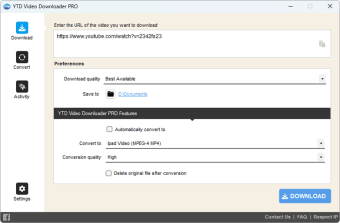
In the first look, you’ll notice YTD’s four tabs. Your main go-to section will be the ‘Download’ tab, which lets you paste the video’s URL and choose the preferred quality. If you select the ‘best available’ quality, the program looks for HD 1080p resolution. However, for a faster download and smaller file size, it’s better to lower the selection to ‘normal’ or HQ 360p.
Once you’ve selected the desired quality parameters, you need to specify the download location on your Windows PC and that’s all! The program will then start downloading the video. From the ‘Activity’ tab, you can track the progress of downloads. Here, you can view important information, including file size, name of the video, speed, progress, time remaining, etc.
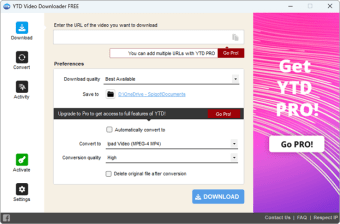
While YTD Video Downloader doesn’t support batch downloads, you can queue video clips to be downloaded one after another. In order to convert or download multiple files simultaneously, you can upgrade to the Pro version. Overall, the download and conversion process is simple and straightforward.
What are the main features?
YTD Downloader features a simple, easy-to-navigate, and clean interface. As mentioned earlier, the features have been categorized into four tabs, marked with large-sized icons. While using the free version of the program, you can’t download multiple files simultaneously. However, you can shuffle multiple tabs to download and watch videos in the built-in player at the same time.
In order to start the download, the first step is to look for a video’s URL in the web browser. You can open a streaming website, Facebook, or YouTube to visit the specific page of the video. You just need to copy the URL from the browser’s address bar and paste it into the designated area in YTD Downloader. Since the tool acts as a web browser, it will ask for your login credentials to initiate the process.
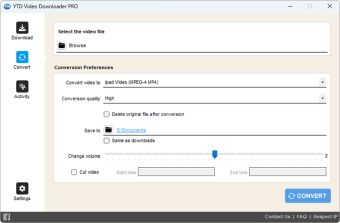
However, YTD isn’t just a YouTube Downloader. You can also use it to convert videos to different file formats, including WMV, MP3, MOV, and MP4. You can even go through the help section to get information about compatibility with Android, iPhone, and Mac. Considering the conversions, you can choose the quality, desired destination folder, and delete the original file as well.
Also, the ‘Convert’ tab comes with a few basic editing tools. For instance, you can adjust the video’s volume, crop the clip, and perform other simple editing tasks. The fourth tab is to play video clips and display results after converting and editing videos.
While YTD downloader is a good choice for the most part, it’s sometimes slow during the download process. For quicker downloads, you could choose the Pro version installer.
What are the alternatives?
Although YTD Downloader meets many video downloading needs, plenty of other choices are available online.
For instance, if you’re only interested in downloading videos from YouTube, 4K Video Downloader could be an excellent choice. With this tool, you can even choose to download only the audio in MP3 format. The simple process matches the speed and quality of the YTD downloader.
Ummy Video Downloader is another good choice for downloading videos. It’s an easy-to-use, free, and convenient program for Windows PCs. The software comes with conversion options, the functionality to queue files, and a simple interface. Unfortunately, even this one doesn’t support batch downloads.
If speed is your main concern, and you’ve been looking for quick downloads, you need look no further than Fast Video Downloader. It supports multiple streaming websites and lets you download videos within a couple of clicks.
Considering all of these options, though, YTD Video Downloader remains a decent choice. With its ease-of-use, you don’t need any technical knowledge or skills to download videos from the internet. Moreover, the program comes with a dedicated FAQ section to explain various terminologies and resolve your doubts.
YTD Downloader is a free, powerful, and simple-to-use tool, Overall, it’s a great choice for your Windows PC, especially if you’ve been using Windows 10. The lightweight program doesn’t affect system resources or slow down your computer.
A basic yet powerful video downloader
Given the free usage, YTD Video Downloader comes with plenty of features to conveniently download videos from the internet. Moreover, the program has a few editing functions and supports file conversions. Overall, it’s a versatile YouTube downloader for your Windows PC.